skip to main | skip to sidebar

Wednesday, November 27, 2013

Web Design Tutorial Part (5)

0 comments
Some HTML Attributes:

Tag                                            Attributes

  • <font>          size="6" face="sutonymj" color="blue"
  • <h1> to <h5> <p>  align="center" align="left" align="right"
  • <body>           bgcolor="yellow" 
  • <table>      height="150px" width="250px" border="6px"

Example:

          <html>
    <head>
           <title>www.techinfo24u.blogspot.com</title>
</head>
<body bgcolor="red"> <font size="6" face="Times New Roman" color="red"> Here will post description. </font>
</body>
</html>

Friday, July 12, 2013

Web Design Tutorial Part(4)

0 comments
HTML list use for sequentially set web content on website.   Bullets tag is needed for designing dynamic web site.

Bullet tag starts with <ul> tag. Every individual data start with <li> tag.

<ul>
<li>Google</li>
<li>Facebook</li>

</ul>

Iframe tag is use for show separate location on web page. Iframe tag start with iframe word.

<iframe src="Web Address" width="250" height="300"></iframe>

Text background color tag is
<p style="background-color:red">Color will depends on color name and code</p>


Tuesday, June 25, 2013

Web Design Part(3)

0 comments
For web design need sometimes , when visitor click on the link then it will open on new tab.
Type this code on body.
<p><a href="URL/" target="_blank">Keyword</a></p>

Color changing is very important for web development. Anyone can easily change website background color  and clickable link color using this code.

<head>
<style type="text/css">
body {background-color:red}
p {color:yellow}
</style>
</head>


On page SEO is needed for increasing page rank. For increase page rank use meta tag technique. This tag keyword and content will hidden.

<meta name= "Websites Main keywords" content=technology, tech tips>


Website auto refreshing tag use for sports news updating websites. Developers can select this code refreshing timer , after how many times websites page will reload.

<meta http-equiv="refresh" content="10">

Sunday, April 14, 2013

Web Design For Beginner (Part 2)

0 comments
Image tag is very important tag for web design . Image tag start with "img" . Use this tag in body.

    <img src="Website Url" width="111" height="140">

For line break use
<br> Content </br>

Link tag use external and internal link.
<a href="Website Url">Keyword</a>

For design need hidden text need comment tag.
<!--Here is Comment -->

<b> That is Bold Tag</b>

<sub> Sub-scripted Tag</Sub>
<sup> Superscript Tag</Sup>

Tuesday, January 22, 2013

Web Design for Beginner (Part 1)

0 comments
HTML Introduction : HTML means Hyper Text Markup Language.
        Open Notepad and type this code :-
<!DOCTYPE html>
 <html>
<title> Title tag</title>
<body>
<h1> It is Heading Tag</h1>
<p> Paragraph</p>
</body>
</html>

click on save as and save format is  new documents.html.

Sunday, November 11, 2012

Friday, August 31, 2012

How enable Hibernate option Your Windows 8

0 comments
Computer hibernation means unsaved data and open program before shutting down and restoring all running power back on.

How enable Hibernate option on your computer flow the step:

     Step1: Go to Setting > Control panel ->Clicks power option.

    Step2 :Click on chose what power button does.

   Step 3: Mark on Hibernate and save.

Thursday, August 2, 2012

How Create Bootable Pen Drive For Windows

1 comments
Install Windows 7 Using Command Prompt:
                                 Firstly need minimum 4 gb pendrive.
Step1:  Open Run option and write"DISKPART". Command prompt will open and write below word step by step.


Step 2: List Disk.

Step 3 : Select Disk 1.

Step4: Clean

Step5: Create partition primary.

Step6: active.

Step 7: format fs=ntfs quick

Step 8: assign

Step 9: Exit.

 Finish bootable process. Copy windows 7 files and paste on pendrive. Restart your pc and press ESC/del/F10 select Boot from USB.


Wednesday, July 11, 2012

Increase your computer Screen color

0 comments
This post is two windows operating system.
  1. Windows XP.
  2. Windows 7.
For windows XP:
            Step1: Go to control panel.
   
            Step2: Double click on gama icon.

           Step3:  Select on second option.

          Step4: Next and next.

        Step5: Chose suitable color.

           Step6: Chose current condition and finish.

For Windows 7:

            Step1: Open search box and type "Display" .


            Step2: Click on display and click left side celibrate  color.

           Step3:  Set adjust gama.

          Step4: Skip brightness and contrast adjustment.

          Step5: Current celebration.

          Step6: Finish.
    

Friday, June 22, 2012

How Your Harddisk Convert to Ram

0 comments
Random Access Memory(RAM) is important part of any computer. Without Ram computer can't open.  Otherwise Ram memory space is short it operate slow performance. Computer speed depends on Random Access Memory Space. If random access memory is high then speed so high or Ram memory short speed so slow.

Hard disk to Ram implementation way:
    Step1: Right  Click on  My computer.  Propertish ----> Advance System setting.
                         
Step2: Click on Advance tab setting.
Step3: After clicking setting again click advance tab change.

     Step4: Click on change select custom setting and ok. See under image.

Best Way For Increase Internet Speed

2 comments
This system is very effective for any users. Anyone flow this way must speed up his performance. This technology give turbo boost performance. When connect with internet then apply this system. Pinging technology speed up 300% performance internet speed. How implement this system. Flow under step ---

   Step1: Go to start menu and open RUN.

    Step2: Write CMD and ok.


Step3: After open command prompt. Write "ipconfig/all".


Step4: Search DNS server address. Example--166.145.45.23. Write another place this address.

Step5: Ping 166.145.45.23 -t

   After finishing the  work command prompt pinging will start.

Monday, June 18, 2012

How Create Run and Tree shortcut

0 comments
Run and Tree both are equal useful for all computer users.  Run helps input any command  to operate computer and tree helps remove all junk file .

   Tree shortcut creating way:
           Click on desktop and right click mouse.


               New  -  ---> Shortcut.
  Click on shortcut button. Type Tree .


Next ---> Finish.


 Run shortcut:
         Start ---->  accessories.
      Copy Run command and it paste on desktop.


Wednesday, June 6, 2012

Windows 8 Keyboard Shortcut Key

0 comments
Keyboard shortcuts means two or more keys which used easily operate computer. It creates easily interact computer.


Windows Shortcut Key:
       
1. Windows logo key + D  -------------- Show Desktop.

2. Alt + tab           ------------------------ Minimize option show.

3. Windows logo key + tab  -------------- 3D View Show.

4. Ctrl + Shift + Esc -----------------------  Task bar will open.

5. Alt + Shift + Prt Sc  --------------------  High Contrast mode open.

6. Windows logo key + E  ----------------  My computer open.

7. F4                --------------------------- Display the item active list.

8. F1      --------------------------------  Show help menu.

9. Tab -----------------------------------  Go forward menu.

10. F5 ----------------------------------   Refresh active window.


Thursday, May 17, 2012

Facebook Timeline Removing Way

0 comments
How Remove Facebook Timeline Easily:
                  Facebook timeline is latest style of facebook. It is modern style. Majority percent of facebook users dislike this system. Without software it remove is difficult.This software work with mozila firefox.  Download this software Click here. 

               Open mozila firefox -- Tools---add ons -- Tools from all add ons-- Inatall  add ons from file.

                                  Install it and restart firefox. If anyone want to remove this add-ons

              Tools--add-ons -- Extention-- Remove.


Monday, May 7, 2012

Vice City Cheat Code

0 comments

Grand Theft Auto Vice City Cheats:
            Vice city cheats is very helpful for gamer. It helps easily complete mission. Without cheat code complete mission is difficult.Vice city cheat code make gamer attractiveness. Cheat code is very effective it creates significant change in game play.


Health and Weapon Cheats:
                                                                  Cheat Code
          Make full health    -----            ASPIRINE
         Strong weapons    ------          NUTTERTOOLS.

       Extra health level     ------          PRECIOUSPROTECTION.

        Another Tools     ------------      PROFESSIONALTOOLS.


   Car/ Vehicle Cheats  :

                                                           Cheat Code 


        Car will fly          --------     COMEFLYINTHESKY.

       Tank will come    ---------     PANZER.
    
         Cars float on water    -----     SEAWAYS.
     Destroy all frontal car  -----       BIGBANG.

       Quick game play         ----     ONSPEED.

Saturday, April 28, 2012

Google Chrome Shortcut With New Verson

0 comments


The latest version of Google chrome released new shortcut for users. To using Google Chrome shortcut anyone able to use this browser easily.


 Google Chrome shortcuts are --
           Ctrl+shift+N---Will open new window.
           Ctrl+shif+T---Recently closed tab will open.
           Shift+Esc-----Task manager open.

Chrome Tab Shortcut:--
             Ctrl+T    --- Open new tab.
             Ctrl+N   ---- Open new window.
             Ctrl+B  -----  Bookmark bar on off.
             Ctrl+J   -----Show download page.
              Ctrl+H  ----- View history page.


Google Chrome Webpage Shortcut:
               
                      F5  --------   Reload current page.
                      Ctrl+ F  ------Find box open.

                       Ctrl++  ----   Page zoom in.
                       Ctrl--     ---   Page zoom out.

                       Ctrl+U   ---    View source.

Download Google Chrome Click this link
                      

Friday, April 27, 2012

Windows 8 Consumer Preview

0 comments

Microsoft has released latest version of operating system Windows 8  .  This operating system  running with 32 bit and 64 bit hardware. Windows 8 can run on tablet PC  and laptop computer. It is faster than other windows operating system. This system is possible to use in touch screen pc.

Windows 8 New Features


1. Deduction in boot time: New operating system approximate boot time is more than 8 seconds.  It is very effective for all users.


2. Metro Interface:  Windows 8 start with new features and easy to use.  This operating system is fully easy and ease all users.

3. Better Touch Skin:  Microsoft new windows operating system is sensitive as well. Users not need to keyboard. They will easily operate it use their fingers.

4. Windows Explorer  New:  New Internet Explorer are included this operating system. It is easily possible to use offline web application.

5. Invention For Modern Generation:  Windows 8 is awesome invention for modern computing.

What is Hard Drive

1 comments

Hard drive is part of memory unit. It is called Hard Disk. Hard Disk is permanent memory storage whose are called ROM. Now a days modern age computer Hard Drive contains several billion bytes.
   Hard Drive is set of stack disk. Which recorded data electromagnetically in concentric circle. Hard drive set rotation speed  4500 to 7500 RPM. Hard Disk working time measured with millisecond.

Thursday, April 26, 2012

Hard Drive Organization Way

0 comments

Computers work some days many program are d organize . Reorganize is essential every week. Without software anyone able to solve this problem. Use defragment option and reorganized your computer. Following this step--
     1. Right button click on C drive --- Propertish.

    2.  Click on Defragment program , Disk defragment will start.

    3. When complete C drive defragment , other drive defragment with same system.

Speed Up Computer Boot Up Time

2 comments


How to increase Computer boot up time:
    Some computer open with less than 20 minutes but generally its estimate time is 30 seconds.

Step1:  Decrease start up program.
When computer start then install program running for this reason computer boot up time increase.


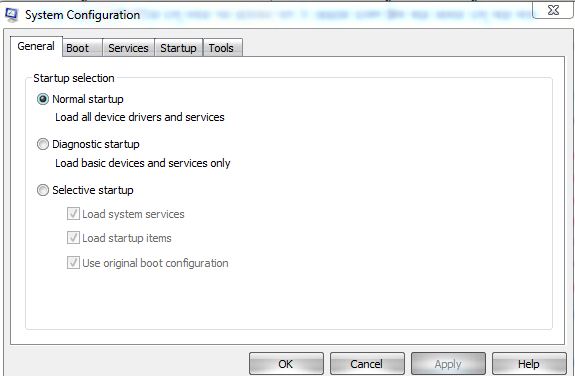
Step2: Start ---- > Run.

Step3: Msconfig---------------Press Enter.


Step3: Will open system configuration Utility. Click on the service/start up. Which program little important this program unmark and press OK.