skip to main | skip to sidebar
Showing posts with label Computer. Show all posts

Friday, June 22, 2012

How Your Harddisk Convert to Ram

0 comments
Random Access Memory(RAM) is important part of any computer. Without Ram computer can't open.  Otherwise Ram memory space is short it operate slow performance. Computer speed depends on Random Access Memory Space. If random access memory is high then speed so high or Ram memory short speed so slow.

Hard disk to Ram implementation way:
    Step1: Right  Click on  My computer.  Propertish ----> Advance System setting.
                         
Step2: Click on Advance tab setting.
Step3: After clicking setting again click advance tab change.

     Step4: Click on change select custom setting and ok. See under image.

Monday, June 18, 2012

How Create Run and Tree shortcut

0 comments
Run and Tree both are equal useful for all computer users.  Run helps input any command  to operate computer and tree helps remove all junk file .

   Tree shortcut creating way:
           Click on desktop and right click mouse.


               New  -  ---> Shortcut.
  Click on shortcut button. Type Tree .


Next ---> Finish.


 Run shortcut:
         Start ---->  accessories.
      Copy Run command and it paste on desktop.


Wednesday, June 6, 2012

Windows 8 Keyboard Shortcut Key

0 comments
Keyboard shortcuts means two or more keys which used easily operate computer. It creates easily interact computer.


Windows Shortcut Key:
       
1. Windows logo key + D  -------------- Show Desktop.

2. Alt + tab           ------------------------ Minimize option show.

3. Windows logo key + tab  -------------- 3D View Show.

4. Ctrl + Shift + Esc -----------------------  Task bar will open.

5. Alt + Shift + Prt Sc  --------------------  High Contrast mode open.

6. Windows logo key + E  ----------------  My computer open.

7. F4                --------------------------- Display the item active list.

8. F1      --------------------------------  Show help menu.

9. Tab -----------------------------------  Go forward menu.

10. F5 ----------------------------------   Refresh active window.


Friday, April 27, 2012

What is Hard Drive

1 comments

Hard drive is part of memory unit. It is called Hard Disk. Hard Disk is permanent memory storage whose are called ROM. Now a days modern age computer Hard Drive contains several billion bytes.
   Hard Drive is set of stack disk. Which recorded data electromagnetically in concentric circle. Hard drive set rotation speed  4500 to 7500 RPM. Hard Disk working time measured with millisecond.

Thursday, April 26, 2012

Speed Up Computer Boot Up Time

2 comments


How to increase Computer boot up time:
    Some computer open with less than 20 minutes but generally its estimate time is 30 seconds.

Step1:  Decrease start up program.
When computer start then install program running for this reason computer boot up time increase.


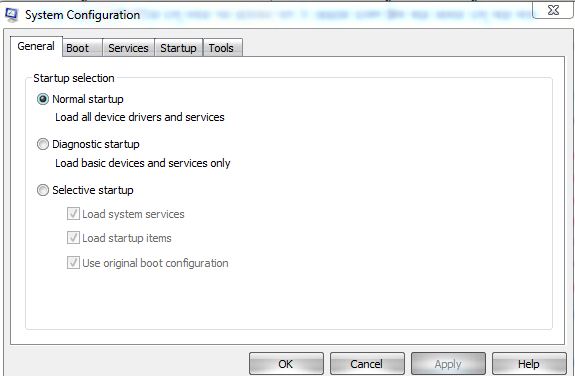
Step2: Start ---- > Run.

Step3: Msconfig---------------Press Enter.


Step3: Will open system configuration Utility. Click on the service/start up. Which program little important this program unmark and press OK.

Wednesday, August 31, 2011

Refresh

0 comments
Refresh your computer:
  1.  Term commonly associated with computer refresh to the renewal of the screen contents. As the refresh rate is increased the image will become more clear. it is recommended that users run their computers with a least a 75 MHz refresh rate. Lower refresh rate commonly cause strain on the eyes  . 
  2. When referring to computer memory refresh to the recharging of dynamic RAM DRAM chips that allow those chips to keep the data they are storing available . Memory refresh rate is commonly displayed as xk where x is number such as 2 or 4 . If the memory has a refresh rate of 2k this indicates there are 2 thousands rows. The refresh cycle indicate the time it requires to complete on row .
  3. Refresh may also refer to a software utility developed to helpe improve the performance how memory is handled on a computer.
  4. When referring to a computer battery refresh commonly refers to a hardware device capable of resetting the memory on Ni cad batteries.
  5. The refresh button and refresh