skip to main | skip to sidebar

Friday, April 27, 2012

What is Hard Drive

1 comments

Hard drive is part of memory unit. It is called Hard Disk. Hard Disk is permanent memory storage whose are called ROM. Now a days modern age computer Hard Drive contains several billion bytes.
   Hard Drive is set of stack disk. Which recorded data electromagnetically in concentric circle. Hard drive set rotation speed  4500 to 7500 RPM. Hard Disk working time measured with millisecond.

Thursday, April 26, 2012

Hard Drive Organization Way

0 comments

Computers work some days many program are d organize . Reorganize is essential every week. Without software anyone able to solve this problem. Use defragment option and reorganized your computer. Following this step--
     1. Right button click on C drive --- Propertish.

    2.  Click on Defragment program , Disk defragment will start.

    3. When complete C drive defragment , other drive defragment with same system.

Speed Up Computer Boot Up Time

2 comments


How to increase Computer boot up time:
    Some computer open with less than 20 minutes but generally its estimate time is 30 seconds.

Step1:  Decrease start up program.
When computer start then install program running for this reason computer boot up time increase.


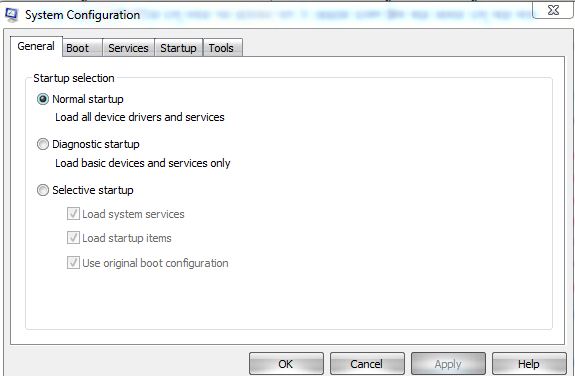
Step2: Start ---- > Run.

Step3: Msconfig---------------Press Enter.


Step3: Will open system configuration Utility. Click on the service/start up. Which program little important this program unmark and press OK.

Monday, March 19, 2012

Difference Between 32Bit And 64Bit Computing

0 comments


 What is Main Difference of it ?

64-bit computing:
        This computing gives you support more system memory and generally improved performance across the board. Recent years around beginning of computing but it is not mainstream consumer market place .  First aided by Intel implement which called Intel® 64. From that time people start  use  this operating system that supported the technology and  applicants easily know it advantage.

Main Difference:
     In general computing process 32-bit and 64-bit refer to the size of data with memory addresses. 64-bit  computing is long values which supported Memory and CPU. Think you have 32-bit phone book and the integers are the contact information for people.
The 32-bit phone book ability is 4(GB) of memory or over four billion integers. So 32-bit memory able to saved all world people name and contact information.
It is certain that 64-bit computing ability is over eighteen quintillion integers that store all name and information present and future will come.
How 64-bit computing get:
      Every modern operating system is designed around the 64-bit bit format.  Average desktop computer this system support between eight GB and sixteen GB memory with high quality motherboard. This system increase RAM speed and hard drive uses and speedy mod CPU.

Tuesday, February 28, 2012

How to Increase Internet Speed

2 comments
Internet Speed Increase Your Computer:
    Windows reserve twenty percent bandwidth for windows update. Flowing this process and solve this problem-

Step1:  Click start menu and open RUN and type gpedit.msc.


Step2: Click Local computer policy. 


Step3: Administrative Template.


Step4: Go to Network.


Step5:  Qos Packet Scheduler > Left side reservable  bandwidth.


Step6: Click Enable > Bandwidth limit > 0 > Press OK


Step7: Restart your computer.


 When will restart computer then see Internet speed increase more than before. But set  up windows system will changed.


Tuesday, January 10, 2012

Hide Computer Hard Drive

0 comments
Use Run Command and Hide Hard Drive:
                    Firstly go to run . Type "CMD" enter.
 Open command promt. Type "DISKPART" enter. Whose volume hide type volume number. If want hide volume "F" then type "Select volume 4"  press enter.
 "Remove letter F".
 Again see your drive type "Assign letter F"
 Close command prompt..

Monday, January 9, 2012

Mobile Opera Mini Browser Bangla Show System

0 comments
See bitmap font your Opera Browser:


                    All mobile could not support bangla content. Bangla font show posible use Opera Mini web browser. Flow this step-
               Step:1 Open opera web browse.
               Step:2 Write"opera:config" (without www)
               Step:3 See last option "Use bitmap font for complex scripts"
               Step:4 Click "Yes"
               Step:5 Restart your mobile phone.